Enable Customer Access to Security Information
The Security Center is Alpha. The features and functionality described on this page are subject to change.
The Enterprise Portal Security Center allows you to provide key security information to your enterprise customers alongside your application releases.
The Security Center tab of the Enterprise Portal is not enabled by default. See Enable the Enterprise Portal Security Center. When enabled, the Security Center intelligently filters data based on the customer's installation type, ensuring that customers only see relevant security information.
On the Security Center tab of the Enterprise Portal, for each available release version, customers can:
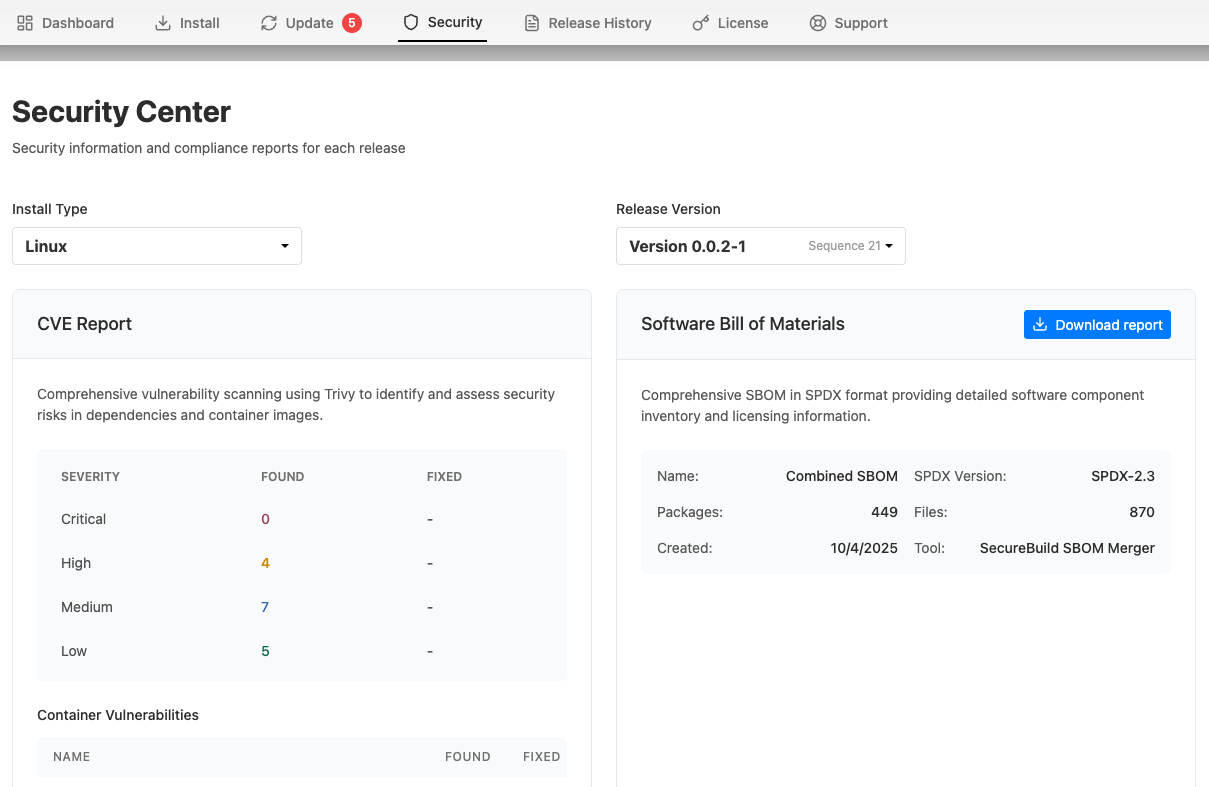
- View a CVE report with the complete list of known vulnerabilities and their severity levels
- View details about the vulnerabilities identified for each image
- Understand how many CVEs are fixed by upgrading to newer versions
- Download the Software Bill of Materials (SBOM) in SPDX format for compliance and security audits
The following shows an example of the Security Center dashboard in the Enterprise Portal:
View a larger version of this image
Enable the Enterprise Portal Security Center
The Security Center tab in the Enterprise Portal is not enabled by default. If the Security Center feature flag is enabled for your Vendor Portal team, you can optionally enable the Enterprise Portal Security Center tab on a per-customer basis or globally for all customers.
To enable the Security Center tab in a customer's Enterprise Portal, go to Customers > [Customer] > Enterprise Portal access.
To enable the Security Center tab for all customers using the Enterprise Portal, go to Enterprise Portal > Portal Settings > Optional Features and enable the Enable Security Center feature toggle.